
Computer hardware is the physical parts or components of a computer.Hardware refers to the physical elements of a computer. Also referred to as the machinery or the equipment of the computer. Examples of hardware in a computer are the keyboard, the monitor, the mouse and the processing unit However, most of a computer’s hardware cannot be seen; It’s inside the computer case.
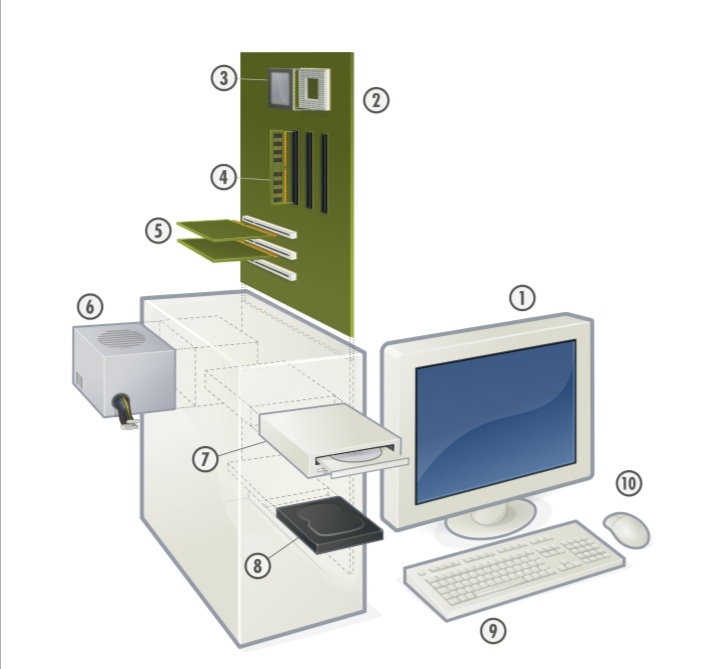
- Monitor
- Motherboard
- CPU(Microprocessor
- Main memory(RAM)
- Expansion cards.
- Power supply unit.
- Optical disc drive.
- Hard disk drive (HDD).
- Keyboard.
- Mouse.
All of which are physical objects that are tangible.by contrast,software is the set of instructions that can be stored and run by hardware.
COMPUTER HARDWARE: PARTS & FUNCTION
1.External Components
2.Mouse The mouse is a pointing device that sends control signals into the computer. It is used to move the cursor (usually arrow icon) on the screen and to perform click actions. BackMonitor It is used to display data in visual form (which can only be seen).The images it display are where the user gets information.
3. Monitor It is used to display data in visual form (which can only be seen).The images it display are where the user gets information.
4. Keyboard This contains set of keys that are used to input characters (letters, numbers) and control signals into the computer.
5. AutomaticVoltage Regulator It protects the computer from changes in the electricity that may damage the computer components. It regulates the voltage that goes to the computer.
6. System Unit It serves as a container of the computer’s internal parts (motherboard, CPU, etc.
THE INTERNAL COMPONENTS
1.Internal Components. 2.Power Supply Unit It converts the main alternating current into low-voltage direct current that is supplied to other parts. A power supply unit has its own fan.
3.Hard Disk Drive It is the main storage device of the computer. It is where most of the files of the computer (such as the ones found in Desktop) are stored.
4.Optical Disc Drive It reads or writes data into optical discs (CD, DVD, Blu-ray Disc
5.Random Access Memory Module It is the temporary storage device of the computer. It is used to hold the data that the computer is working on. The black rectangles are called RAM chips.
6.Central Processing Unit This is referred to as the computer’s brain as it does the processing job of the computer.This means that it is responsible for manipulating the data.
7.CPU Fan and Heatsink These two components work together in keeping the CPU from overheating.The metal is called the heatsink as it conducts heat from the CPU while the CPU fan blows the air to the heatsink.
8.System Fan This is found at the left side panel and the back panel of the system unit. It directs the flow of air in the system unit.
9.Motherboard It is the main circuit board of the computer that connects all other part
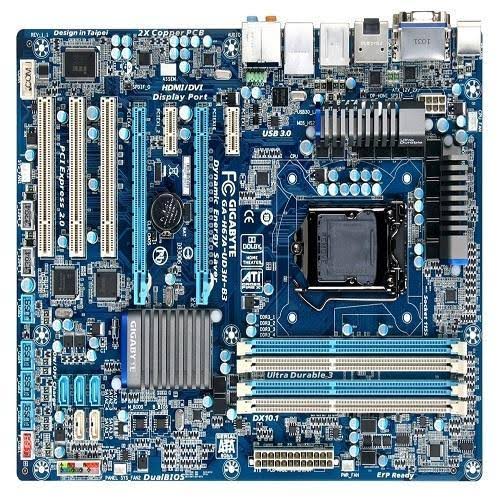
The motherboard is a piece of hardware that makes connections in the right places between all of the other components in a computer. It tells data where it should go. When the CPU is finished processing some data, it might say to the CPU, OK, put this in the HDD, and the motherboard will figure out where the HDD is and send the data there.
PARTS OFTHE MOTHERBOARD
●Slots These are where the expansion cards such as modem card and graphics card are installed.These are different types of slots.
●RAM Slots These are where the RAM modules are installed.
●Northbridge Located between theCPU socket, Expansion slots, and RAM slots. It coordinates the flow of data between theCPU, graphics card, and RAM
●Southbridge Located below the expansion slots, the Southbridge handles all of the computer’s input/output functions. The location of the two Chipsets
●BIOS Chip It stands for Basic Input/Output System. It contains the program that checks devices to know if the computer is ready to startup.
●CMOS RAM It is the one that holds data used by the BIOS or Operating System.These data includes time, date, BIOS password.
●CMOS Battery It provides the power used by the CMOS RAM so that even when the computer is off, the CMOS RAM can still keep data (this means time and date will not be reset).
●Back Panel Ports Located at the back of the motherboard.This is where most of the computer peripherals are connected.These peripherals include the keyboard, mouse, and printer.
●Front Panel Headers It is mostly located at the left and front side of the motherboard. Most computers have three front panel headers: system panel headers, audio headers, USB headers.
●CPU Socket It is where the CPU is installed.
●20+4 Pin ATX Main Power Connector It is where the 20+4 Pin ATX Main Power Connector of the PSU is connected.
●4 Pin ATX 12V Power Connector It is where the 4 Pin ATX 12V Power Connector of the PSU is connected.
●CPU Fan Header It is where the CPU fan is connected to get its power.
HARDWARE AND SOFTWARE
Hardware and software are interconnected,witout sofware,the hardware of a computer would have no function.however,without the creation of hardware to perform tadks directed by software via the central processing unit,software would be useless. hardware and software must work together.
DIFFERENCES BETWEEN HARDWARE AND SOFTWARE
Computer hardware is any physical device used in or with your machine,where as software is a collectuon of codes installed onto your computer’s hardrive…. ..take for example a video computer,avideo game,which is software; it uses the computer processor (CPU),memory (RAM),hard drive,and video card to work.
 MY SITE